The most-flown airliner in the sim, and the dispatch math behind it
The Fenix A320 is the single most-used addon in MSFS. Here is what real A320 takeoff and landing performance involves, and how SkyNexus does it without scraping the FCOM.
Navigraph ran their 2026 community survey across more than 15,000 respondents and the headline is bluntly useful: the Fenix A320 is the single most-flown addon in the sim, used by 42.4 percent of pilots. PMDG’s 737 sits behind at 31.5 percent. MSFS 2024 itself is on 49.5 percent of installs. If you build software for sim pilots, you build for the A320 first.
That is the audience SkyNexus shipped a full takeoff and landing performance module for last month. This post is what the math actually does, why we did it the hard way, and where the limits are.
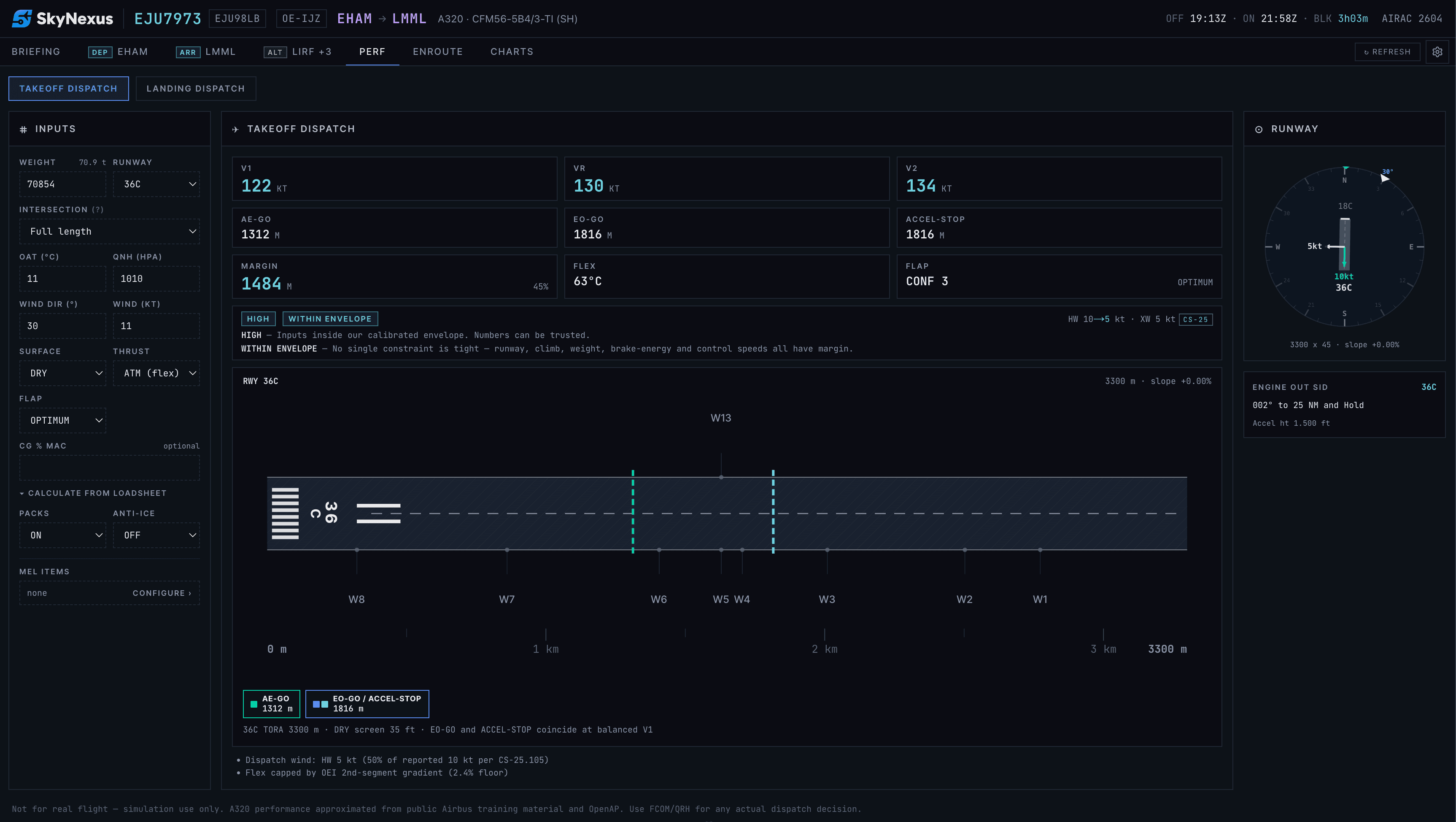
What an A320 dispatch calc actually contains
On a real flight the dispatch number set is not just “V1, VR, V2.” It is a layered set of decisions:
- Three runway distances. All-engine takeoff distance, one-engine-inoperative takeoff distance, and accelerate-stop distance. Each has to fit on the runway with margins.
- V-speeds. V1, VR, V2 derived from the actual weight, flap setting, OAT, runway condition and ambient pressure, not a fixed table.
- Flex temp. The reduced-thrust assumed temperature for derated takeoff. Saves engine wear in the airline world, lets sim pilots fly a quieter takeoff in ours.
- Optimum flap. Whether to take off CONF 1+F, 2 or 3. Driven by runway length, climb gradient and obstacle clearance.
- Autobrake and reverse. Setting and reverse usage for landing, sized to the runway, the wind and the landing weight.
- MEL items. Inoperative equipment that changes the numbers (anti-skid out, packs off, etc.).
- CG and trim. A center-of-gravity from the loaded payload feeding the green-band trim setting on the THS.
Most sim performance tools expose two or three of these and call it a day. SkyNexus exposes all of them, autofills them from your SimBrief OFP and the live METAR, and explains every number with a tap.
Why we did it the hard way
There is a tempting shortcut in this space: scrape the official Airbus FCOM PDFs, key in the numbers, ship a lookup table. It works until you are off the table edges, and it works at all only because nobody is checking your methodology.
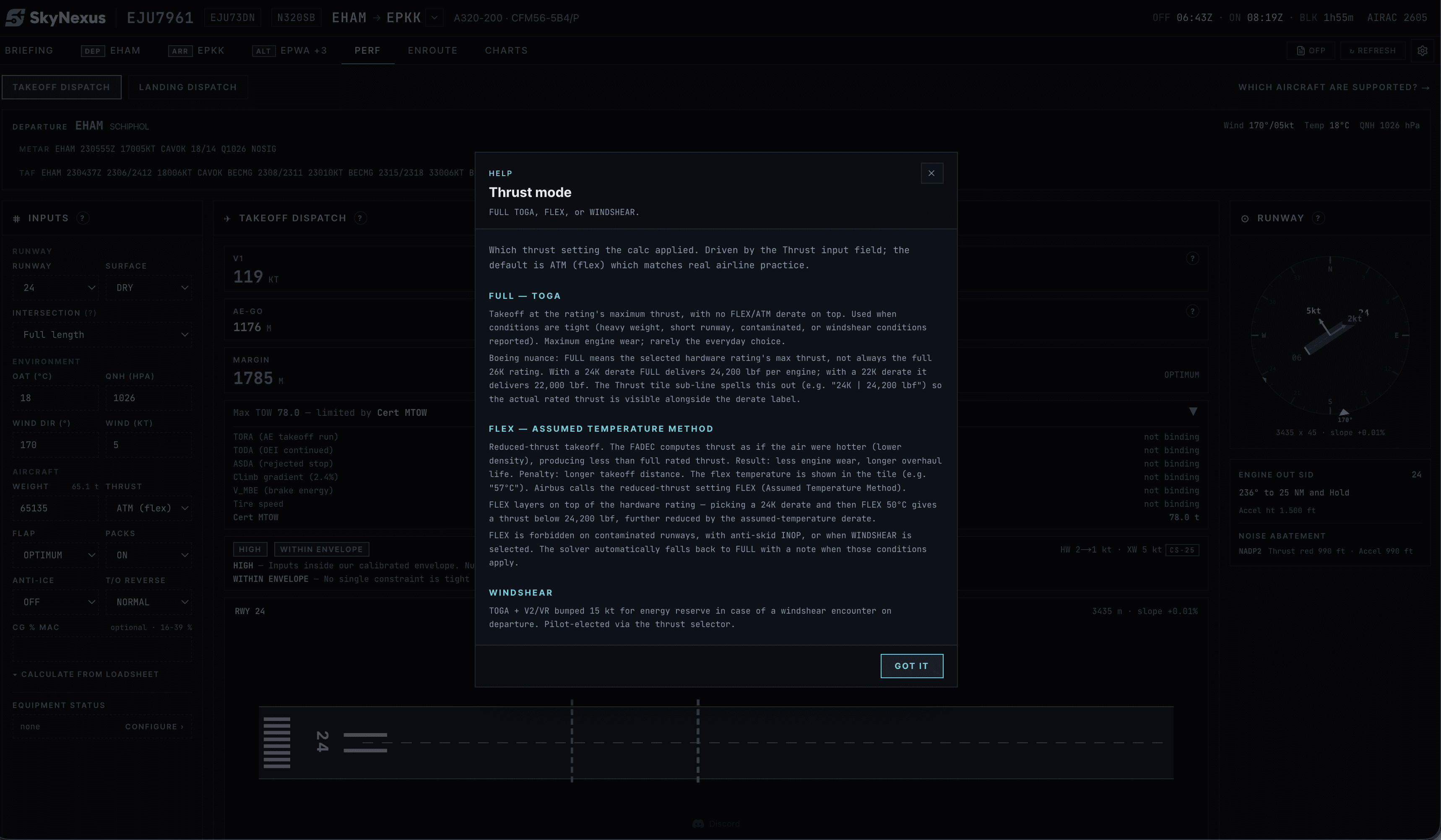
We refused that path for two reasons. First, it is a copyright landmine. Second, you cannot audit it. So SkyNexus derives the numbers from public Airbus material (released technical papers, regulatory filings, performance charts in the public domain) and the open-source OpenAP aircraft performance library. Every input and every step is in code you can read. Every output has a help modal that walks you through the derivation.
For a sim pilot who wants to understand the numbers rather than just consume them, that distinction matters. For a sim pilot who just wants the numbers, it does not show up: the UI looks like any other perf tool. The methodology only matters when you ask “why is V1 here and not 2 knots higher.” SkyNexus tells you.
What it integrates with
The perf module is not a standalone calculator. It reads:
- Your SimBrief OFP for weight, fuel, payload and origin/destination.
- The live METAR at departure and arrival for OAT, QNH, wind and runway condition.
- The runway geometry from the airport database, including slope and declared distances.
- The selected runway from your filed flight plan or your manual override.
So when you change the OFP, the perf updates. When the METAR refreshes, the perf updates. When you reselect a runway because ATC changed configuration, the perf updates. There is no second screen to keep in sync.
Where the limits are
- A320 and 737-800 today. Widebodies are further out.
- Dry, wet and contaminated runway models are first-order. Real contamination performance has corner cases SkyNexus does not yet cover.
- MEL coverage is the most operationally relevant items, not every line of the actual MEL.
- We do not certify anyone’s real flight. This is for simulation and education. Always.
The thing nobody else is doing
The combination of “real dispatch math, fully open methodology, fully integrated with the rest of your briefing, free, in a browser” is not a product anyone else ships today. Vortiq has good performance tables behind a paywall. The in-sim Asobo perf is a toy. ForeFlight is for real pilots flying real Cessnas.
The reason it does not exist is mostly that it is unglamorous to build. The Airbus literature is fragmentary. OpenAP needs adapter code for each aircraft variant. The METAR-to-perf integration is finicky. We did it because the survey numbers say the audience is real, and because every time we did a SkyNexus briefing on an A320 leg the absence of perf in the same screen kept showing up as a paper cut.
Try SkyNexus EFB
Free, browser-based, runs alongside MSFS 2024, X-Plane or P3D. Import your SimBrief OFP and get the full briefing in under a minute.
Get Started Free