A321 and A321neo takeoff and landing performance, from your SimBrief OFP
File an A321 or an A321neo in SimBrief and SkyNexus works out the takeoff and landing numbers for that airframe: V-speeds, FLEX temperature, the best flap setting and the margin on every runway distance. Each type has its own model, so the numbers fit the longer fuselage and the heavier weights instead of a scaled-up A320. It is free and runs in your browser next to the sim.
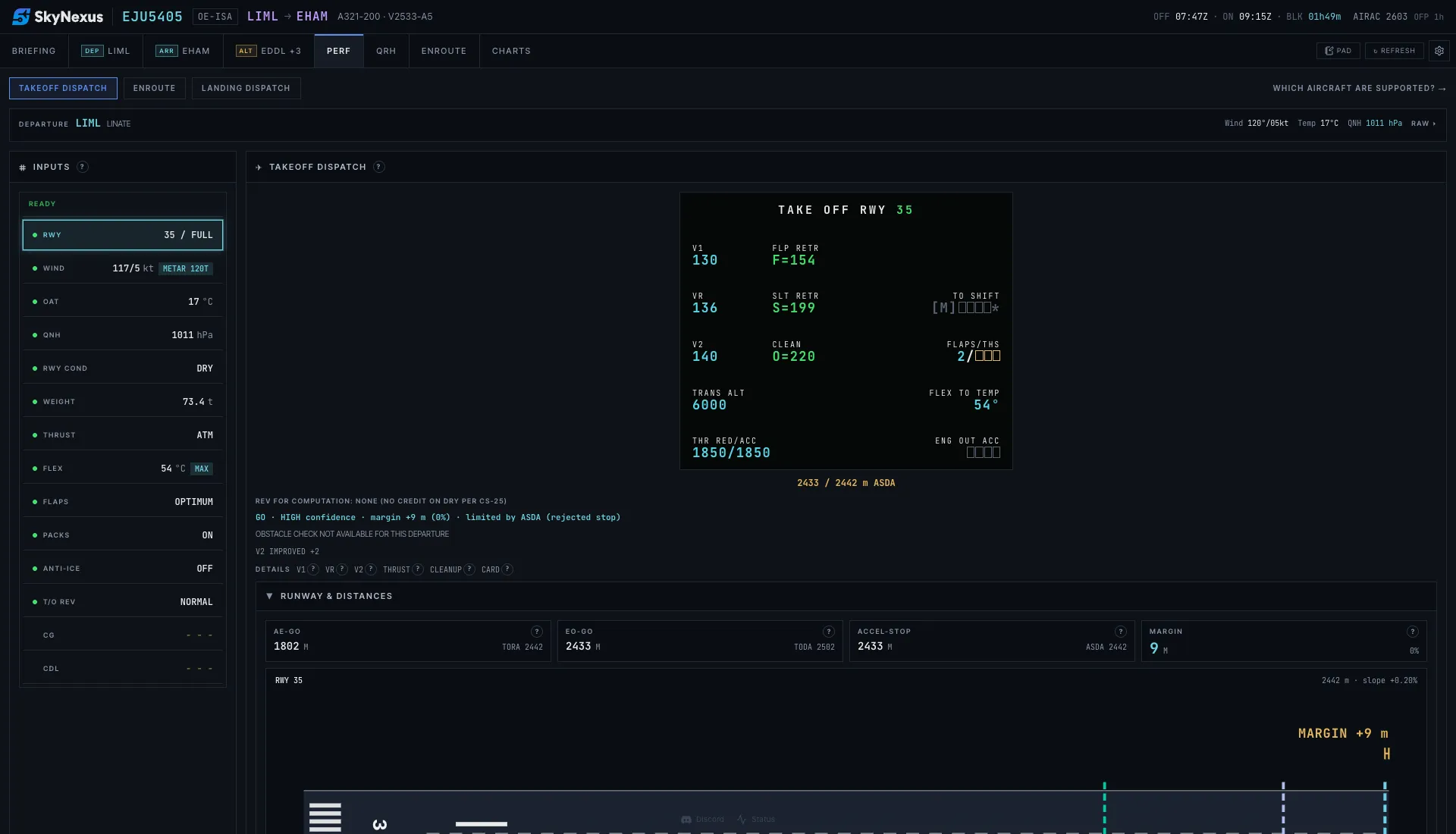
Every takeoff number you enter into the MCDU
- V1, VR and V2 for CONF 1+F, 2 and 3. OPTIMUM checks all three and picks the flap that leaves the most runway margin.
- FLEX temperature up to the certified limit: ISA+42 on the A321 with V2533-A5 engines, ISA+52 on the A321neo with LEAP-1A32 engines.
- All three distances checked against the runway: all engines, engine failure and continue, and accelerate-stop, against TORA, TODA and ASDA.
- Minimum control speeds as a floor under V1, VR and V2, and F, S and green dot from the type's own QRH speed table.
Landing distance next to the QRH figure
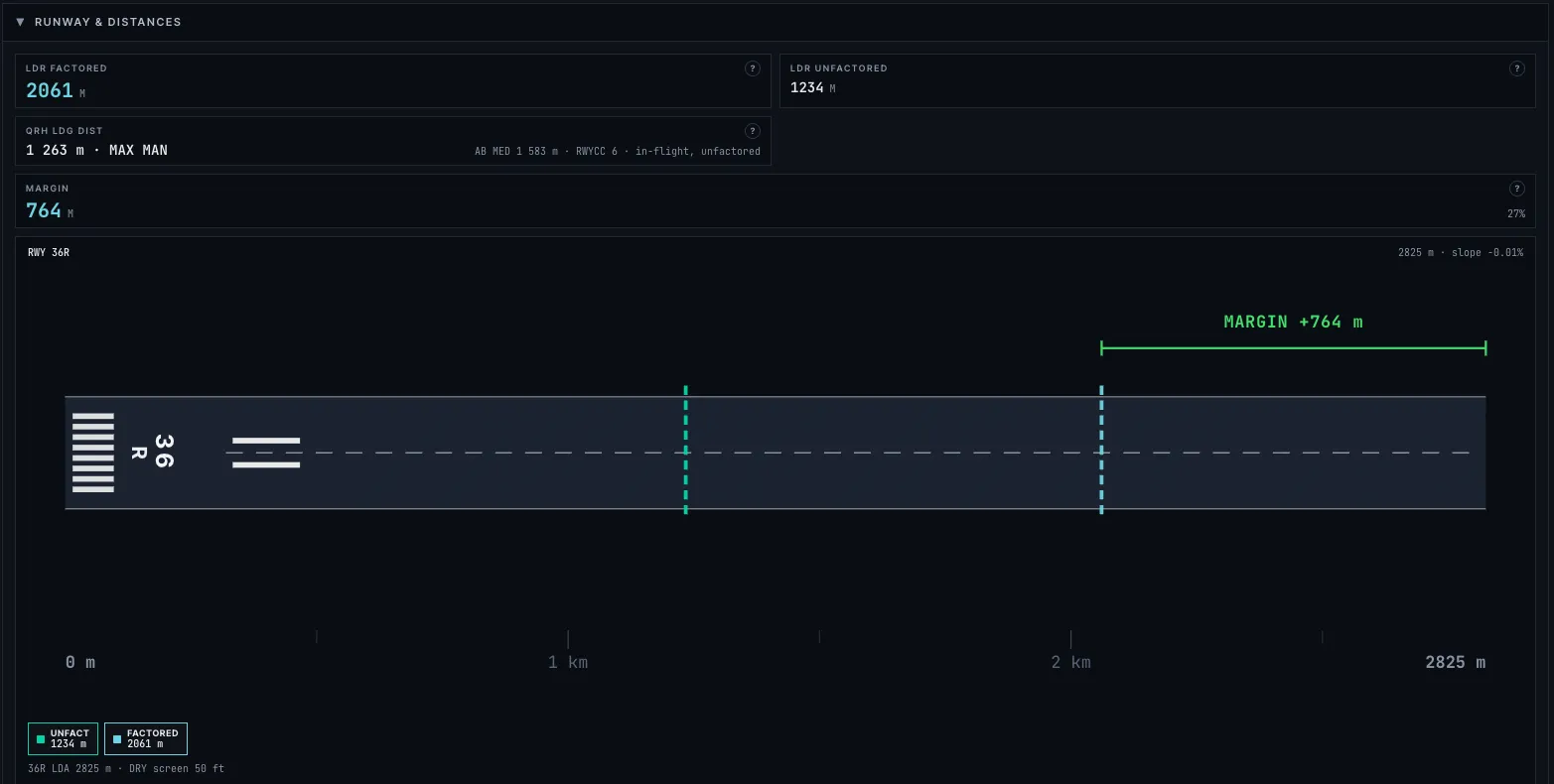
For landing you get the required distance factored for dispatch and the unfactored distance you can expect on the day, for dry, wet and contaminated runways, with autobrake and reverse thrust. Next to it sits the landing distance from the type's own QRH for your runway condition code, which you can enter straight from the SNOWTAM or ATIS. The briefing also predicts which exit you will make.
Landing with a failure
Pick a failure, such as a hydraulic system loss, jammed slats or an engine out, and the approach speed and landing distance follow the QRH correction for it. Both types have the same 13 failure cases, each read from its own QRH, and the landing flap is set to what the checklist asks for.
The rest of the dispatch
- Approach climb: the heaviest landing weight that still makes the engine-out go-around gradient at your airport and temperature. On the A321neo this is checked for CONF FULL landings.
- Missing parts from the CDL with their published penalties.
- Ground brake cooling time after the landing and after a rejected takeoff.
- On the A321: a CG check against the weight and balance limits, the Enroute tab and the A321 handbook in the QRH tab. The A321neo does not have these yet.
Where the numbers come from
The A321 model is calibrated on published A321 takeoff charts and landing tables. The A321neo landing side is calibrated on A321neo QRH tables and Airbus planning curves. No A321neo takeoff charts are public, so its takeoff model is fitted to Airbus planning curves and borrows a few A321 values. Every A321neo takeoff says so on the result, and at sea level on runways of 1 500 m and longer the fit errs on the long side. Every number has a help button that explains how it was worked out. This is a tool for flight simulation and learning. Never use it for a real aircraft.
Flying something else?
- A320 and A320neo performance for the shorter sisters, with the same workflow.
- 737-800 performance with QRH landing speeds, non-normal landings and brake cooling.
A321 performance FAQ
- Is the A321 performance calculator free?
- Yes. Create an account, enter your SimBrief Pilot ID and the performance tab is there for every A321 or A321neo flight plan.
- Which A321 does it model?
- The A321 model has V2533-A5 engines and the A321neo model LEAP-1A32 engines. SimBrief's type code picks the model: A321 for the ceo, A21N for the neo. Because the inputs come from SimBrief rather than from the add-on, it works alongside any A321 in any simulator. Add-ons with other engines or weight variants can show small differences.
- Does it support the A321neo?
- Yes. The A321neo has its own model. Its landing numbers come from A321neo QRH tables. Its takeoff numbers are approximate, because no A321neo takeoff charts are public, and the app marks them that way.
- How accurate is it?
- It is calibrated against published tables for each type and every calculation step is explained in the app. It is accurate enough to fly a realistic departure in the sim. It is not certified and must never be used for real flights.
- Can I use it without SimBrief?
- You can try the app with the built-in demo flight. For your own A321 flights it needs a SimBrief flight plan, which gives it the weight, runway and weather.
Get your numbers for the next departure
Free, in the browser, filled in from your SimBrief flight plan.
Open SkyNexus