Boeing 777-300ER takeoff and landing performance, from your SimBrief OFP
File a B77W in SimBrief and SkyNexus works out takeoff and landing numbers for a 777-300ER with GE90-115B engines: V-speeds, the assumed temperature, the best flap and the margin on every runway distance. The numbers are indicative, built from public Boeing data rather than airline charts, and the app marks every result that way. It is free and runs in your browser next to the sim.
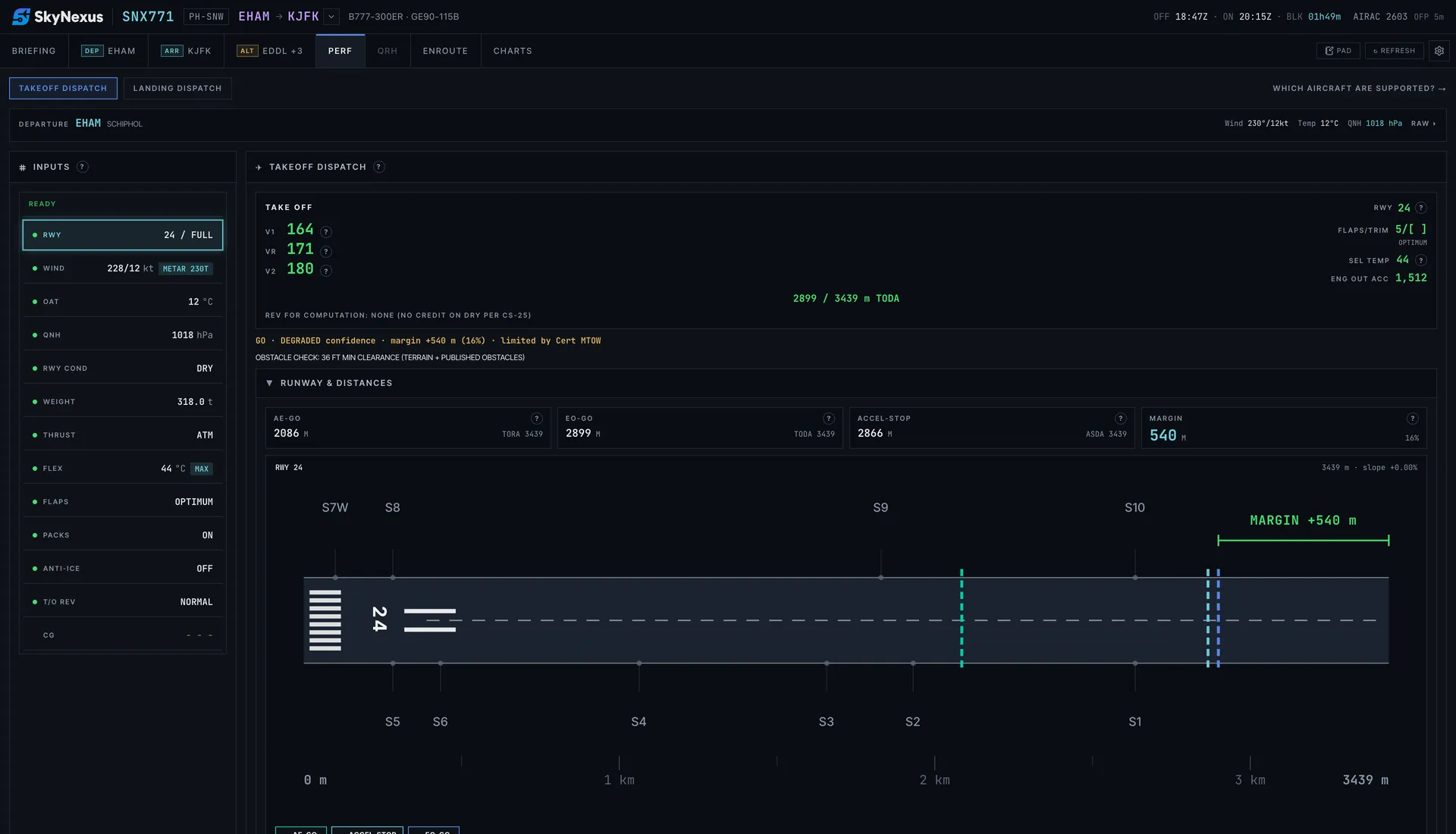
The takeoff numbers for the FMC
- V1, VR and V2 for flaps 5, 15 and 20. OPTIMUM checks all three and picks the flap that leaves the most runway margin.
- Assumed temperature (ATM) with up to 25 % thrust reduction, or full thrust when the runway needs it.
- All three distances checked against the runway: all engines, engine failure and continue, and accelerate-stop, against TORA, TODA and ASDA, with the regulated takeoff weight for the day.
- An obstacle check against terrain and published obstacles on the departure path.
- The tyre speed limit from the EASA type certificate, and the result laid out like the FMC TAKEOFF REF page.
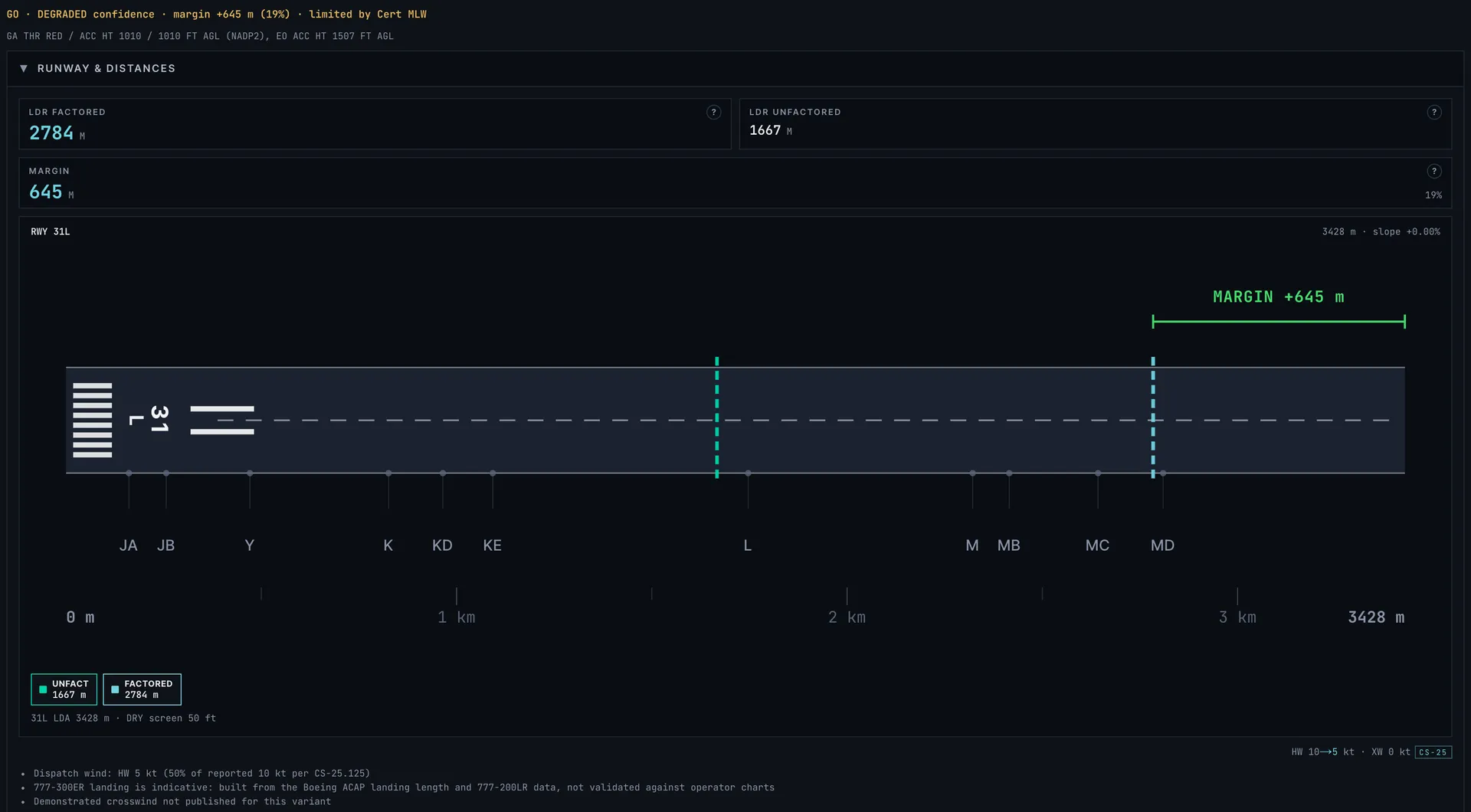
Landing on flaps 25 or 30
Pick flaps 25 or 30 and autobrake 1, 2, 3, 4, MAX or manual braking, with or without reverse thrust. You get the required distance factored for dispatch and the unfactored distance you can expect on the day, on a dry or wet runway. The briefing also predicts which exit you will make, and the diversion assistant shows 777-300ER landing margins at the alternates, tagged indicative.
Where the numbers come from
No 777-300ER FCOM performance data or airline takeoff charts are public, so the model is built from what is: the Boeing airport planning charts for the 777-300ER, the EASA type certificate for the weights and tyre speed, and a 777-200LR operations manual for the speed and autobrake tables. The 200LR parts are labelled as such in the app. Where the sources run out, the model takes the safe side. Every number has a help button that explains how it was worked out.
That makes the numbers indicative: close enough to fly a believable departure in the sim, but not checked against published 777-300ER takeoff and landing tables the way the A320 and 737-800 models are checked against theirs. Every 777 result carries a DEGRADED confidence tag with that note. This is a tool for flight simulation and learning. Never use it for a real aircraft.
Not on the 777-300ER yet
- MEL and CDL items, engine failures and other non-normal landings.
- Derates (TO1, TO2), enroute performance and brake cooling.
- A CG and trim check, and a 777 handbook in the QRH tab.
Other types
- A320 and A320neo performance with FLEX, OPTIMUM flap and the engine-out procedure.
- A321 and A321neo performance with QRH landing distances and failures for both types.
- 737-800 performance with QRH landing speeds, non-normal landings and brake cooling.
- A380-800 performance with FLEX and four-engine climb rules, indicative numbers.
- Every supported aircraft on one page, with what each type covers.
777-300ER performance FAQ
- Is the 777-300ER performance calculator free?
- Yes. Create an account, enter your SimBrief Pilot ID and the performance tab is there for every 777-300ER flight plan.
- Which 777 does it model?
- The 777-300ER with GE90-115B engines, SimBrief type code B77W. Because the inputs come from SimBrief rather than from the add-on, it works alongside any 777-300ER in MSFS, X-Plane or P3D. The 777-200, 777-200LR and 777-300 (B772, B77L, B773) are not mapped to it, because their weights and engines differ.
- How accurate are the 777-300ER numbers?
- They are indicative. They come from public Boeing planning charts, the type certificate and 777-200LR speed tables, not from 777-300ER airline charts, so they can differ from what your add-on's EFB shows. Every result is marked DEGRADED in the app. Use them for the sim only, never for a real flight.
- Can I use it without SimBrief?
- You can try the app with the built-in demo flight. For your own 777 flights it needs a SimBrief flight plan, which gives it the weight, runway and weather.
Get your numbers for the next long-haul departure
Free, in the browser, filled in from your SimBrief flight plan.
Open SkyNexus