Takeoff and landing performance for the FlyByWire A32NX
The FlyByWire A32NX is an A320neo with CFM LEAP-1A26 engines, and that is exactly the A320neo SkyNexus models. File the flight as an A20N in SimBrief and SkyNexus works out FLEX, V-speeds and the takeoff flap, checks the engine-out path against terrain and obstacles, and gives you the landing distance for the arrival. It runs in your browser next to MSFS and it is free, like the A32NX itself.
Built for the same aircraft
SkyNexus has a separate model for the A320neo, calibrated on A320neo data rather than borrowed from the ceo. The engine is the LEAP-1A26, the same as in the A32NX, and the neo has its own characteristic speeds (F, S and green dot) from the A320neo QRH. The QRH tab opens the A320neo handbook.
FLEX on the A320neo
The A320neo can reduce takeoff thrust by up to 25 percent, and the maximum flexible temperature is ISA + 55: 70 °C at sea level, about 2 °C less for every 1 000 ft of elevation. SkyNexus finds the highest FLEX at which every limit still holds, and the help button shows which limit set it: the runway, the engine-out climb, an obstacle, brake energy or tyre speed. FLEX is not allowed on a contaminated runway or when windshear is expected; select TOGA yourself in those cases.
- What FLEX temperature is and how the number is found.
What it adds to the flyPad calculator
The flyPad has a good takeoff and landing calculator of its own, and the FlyByWire docs are open about its scope. SkyNexus covers a few things the docs list as outside it, does one thing differently, and adds the landing side:
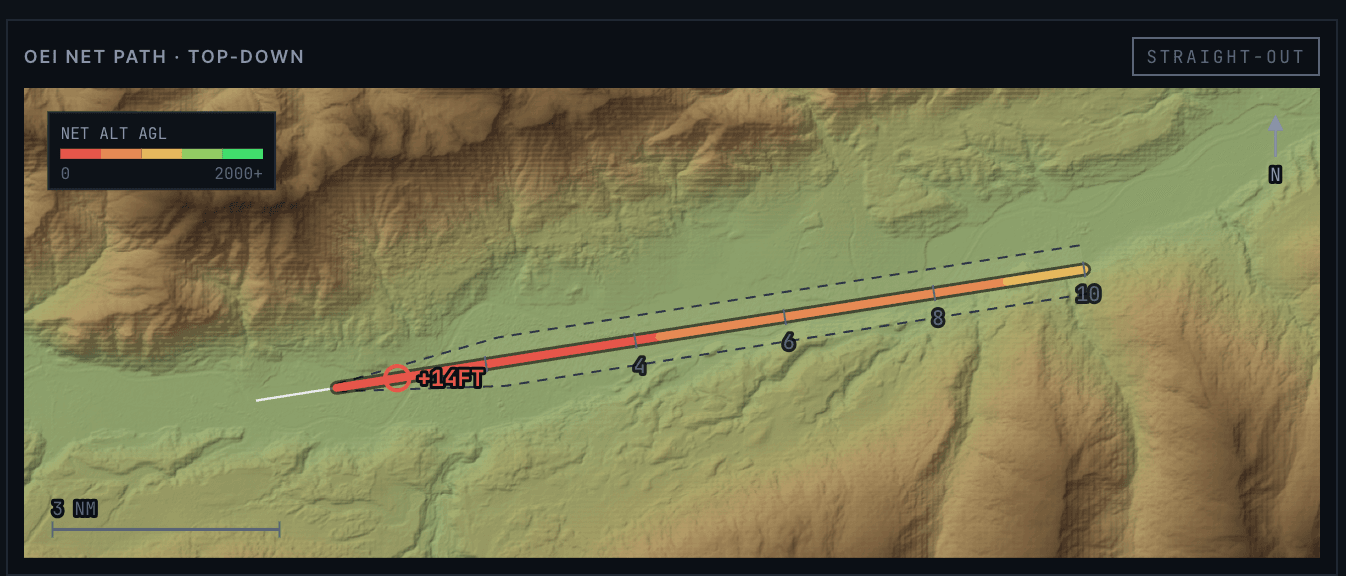
- Obstacles: the engine-out flight path is checked against terrain and published obstacles in the departure sector, and the engine-out procedure is drawn on a map when the airport publishes one.
- Intersection departures, with the TO SHIFT value for the MCDU.
- Runway data: the FlyByWire docs say the flyPad reads the runway from MSFS; SkyNexus uses the declared distances (TORA, TODA and ASDA) from the airport data, so a clearway or stopway counts.
- Next to the flyPad landing calculator: the required and the actual landing distance for dry, wet and contaminated runways, and the runway exit you will make.
What the neo does not have yet
Missing parts from the CDL already carry their published penalties on the neo. A few A320ceo extras are not there yet: MEL items, the runway condition code input and landing distances with a failure. The app says so where it applies. This is a tool for flight simulation and learning, never for a real aircraft.
Flying the A380X too?
SkyNexus has indicative numbers for the A380-800. Its model has GP7270 engines, while the FlyByWire A380X has Rolls-Royce Trent 972B-84 engines, so expect differences and treat the numbers as a guide.
- A380-800 performance (indicative).
- A320 and A320neo performance for the full list of what the A320 models cover.
FlyByWire A32NX performance FAQ
- Does SkyNexus work with the FlyByWire A32NX?
- Yes. File the flight as an A20N in SimBrief and SkyNexus uses its A320neo model with LEAP-1A26 engines, the same engine as the A32NX.
- What is the maximum FLEX temperature on the A32NX?
- For the A320neo with LEAP-1A26 engines the ceiling is ISA + 55, which is 70 °C at sea level and lower at higher airports. SkyNexus uses that ceiling.
- Why does SkyNexus give a different FLEX from the flyPad?
- Most often because of the runway data, the weight or obstacles. SkyNexus uses the declared distances from the airport data and checks obstacles, which can lower the FLEX. The help button on every number shows the limit that set it.
- Is it free?
- Yes. Create an account and enter your SimBrief Pilot ID. You can try it first with the demo flight.
- Is SkyNexus part of FlyByWire?
- No. SkyNexus is an independent, free EFB and is not affiliated with FlyByWire Simulations.
Get your numbers for the next A32NX departure
Free, in the browser, filled in from your SimBrief flight plan.
Open SkyNexus