SimBrief takeoff and landing calculations compared with SkyNexus
Since May 2024 SimBrief has its own takeoff and landing calculator, free and built into the dispatch system most sim pilots already use. SkyNexus reads that same SimBrief flight plan and works out the numbers again with a model per aircraft and engine. This page sets out what each tool does, based on Navigraph's own description of SimBrief, and why the two can give different answers for the same departure.
What the SimBrief calculator does
According to Navigraph's launch post (May 2024), the SimBrief Performance Tool sits in the Performance & Tools tab of SimBrief and is free. It calculates V1, VR and VREF and the weight limits for takeoff and landing, and tells you the reason for each speed and limit. You can switch the bleeds off and pick the flap, thrust and autobrake setting, or let it find the optimum for you. Over one hundred aircraft types were supported at launch, including the 737 and A320 families.
That breadth is the main reason to use it: if your aircraft is not one of the types SkyNexus models, SimBrief is the tool that covers it.
- Takeoff and Landing Calculations Now in SimBrief (Navigraph blog, 28 May 2024).
What SkyNexus does differently
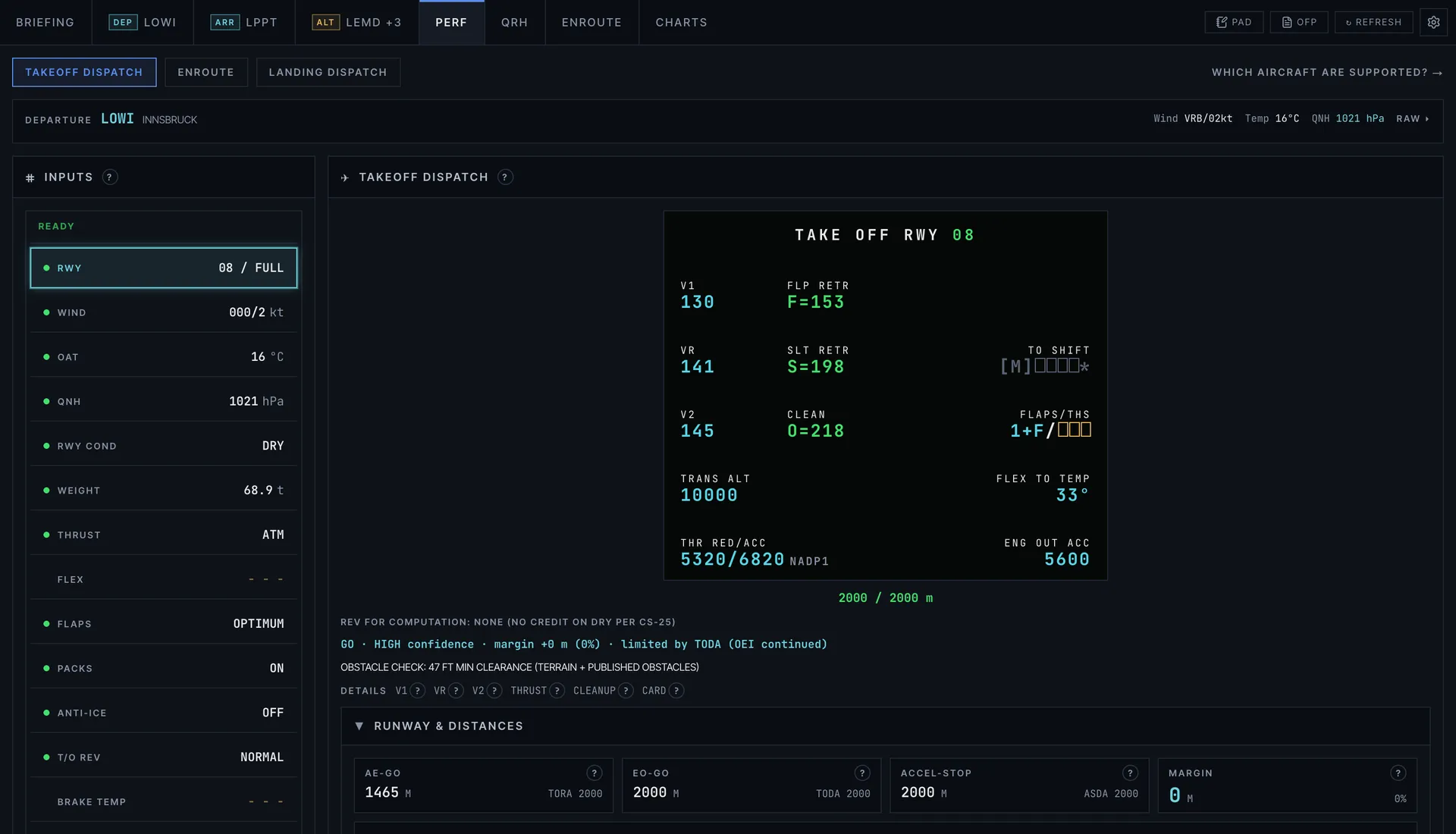
SkyNexus covers fewer aircraft and goes deeper on each one. It takes the weight and runway from your SimBrief OFP, so you do not plan anything twice.
- A model per engine variant. An A320 and an A20N flight plan get different models (CFM56-5B4 and LEAP-1A26), and so do the A321 and A21N (V2533-A5 and LEAP-1A32), picked from the type in your OFP.
- Live weather. Wind, temperature and QNH come from the newest METAR SkyNexus has for the airport, not only the one printed in your OFP. When a newer report comes in, it asks whether to load it before any number changes.
- The runway you filed, with intersections. The takeoff starts from the runway in your OFP, and every distance is checked against TORA, TODA and ASDA.
- FLEX up to the certified limit for each type: ISA + 55 on the A320, ISA + 42 on the A321 and ISA + 52 on the A321neo.
- MEL and CDL. Inoperative MEL items add their published penalties on the A320ceo and 737-800. Missing CDL parts add theirs on the A320ceo, A320neo, A321 and A321neo.
- An obstacle check against terrain and published obstacles on the departure path.
- On landing, a prediction of the runway exit you will make, from your landing weight, the wind and the runway layout.
- Takeoff and landing performance for every supported aircraft.
- How the runway exit prediction works from your landing weight and the live METAR.
Which aircraft SkyNexus covers
The A320, A320neo, A321, A321neo and 737-800, checked against published tables, plus indicative numbers for the 777-300ER and A380-800. On the A321neo only the landing side is checked that way: its takeoff is not validated against operator charts, because none are public, and every A321neo takeoff result says so. For any other type, use SimBrief.
Why the two can disagree
A common question on sim forums is why SimBrief and the EFB in an add-on give different numbers for the same takeoff, and SkyNexus will sometimes differ from both by a few degrees of FLEX or a few knots. That does not mean one of them is wrong. The engine variant, the runway data, the weather each tool reads, whether obstacles are checked, how a wet runway is handled and the weight you actually loaded all move the result. Key SkyNexus numbers have a help button that shows which inputs and limits they used, so you can see where a difference comes from.
- Why takeoff calculators disagree goes through each reason in detail.
- SkyNexus next to the Fenix A320 EFB and which Fenix engine options match.
Using both
You do not have to choose. Plan in SimBrief as you do now, look at its numbers, and open the same flight in SkyNexus for a second opinion with the live weather before you push back. Both are free; SkyNexus needs a free account and your SimBrief Pilot ID.
- How SkyNexus reads your SimBrief OFP and what else it builds from it.
- How SkyNexus compares with the MSFS 2024 in-sim EFB and other sim EFBs.
SimBrief vs SkyNexus FAQ
- Is the SimBrief takeoff calculator wrong?
- Not as a rule. Different tools use different engine variants, runway data, weather and limits, so a few degrees of FLEX or a few knots of difference is normal. Check that the weight, runway, intersection and weather match before comparing.
- Do I still need SimBrief if I use SkyNexus?
- Yes. SkyNexus reads your SimBrief flight plan for the weight, the runway and the route, so you keep planning in SimBrief.
- Does SkyNexus cost anything?
- No. SkyNexus is free. You need a free account and a SimBrief Pilot ID, and SimBrief is free too.
- Which aircraft does SkyNexus calculate?
- The A320, A320neo, A321, A321neo and 737-800, with indicative numbers for the 777-300ER and A380-800. SimBrief covers many more types.
- Is SkyNexus made by Navigraph?
- No. SkyNexus is an independent EFB and is not affiliated with Navigraph or SimBrief.
Get a second opinion on your next takeoff
Free, in the browser, filled in from your SimBrief flight plan.
Open SkyNexus