Performance for the ToLiss A320 and A321 in X-Plane
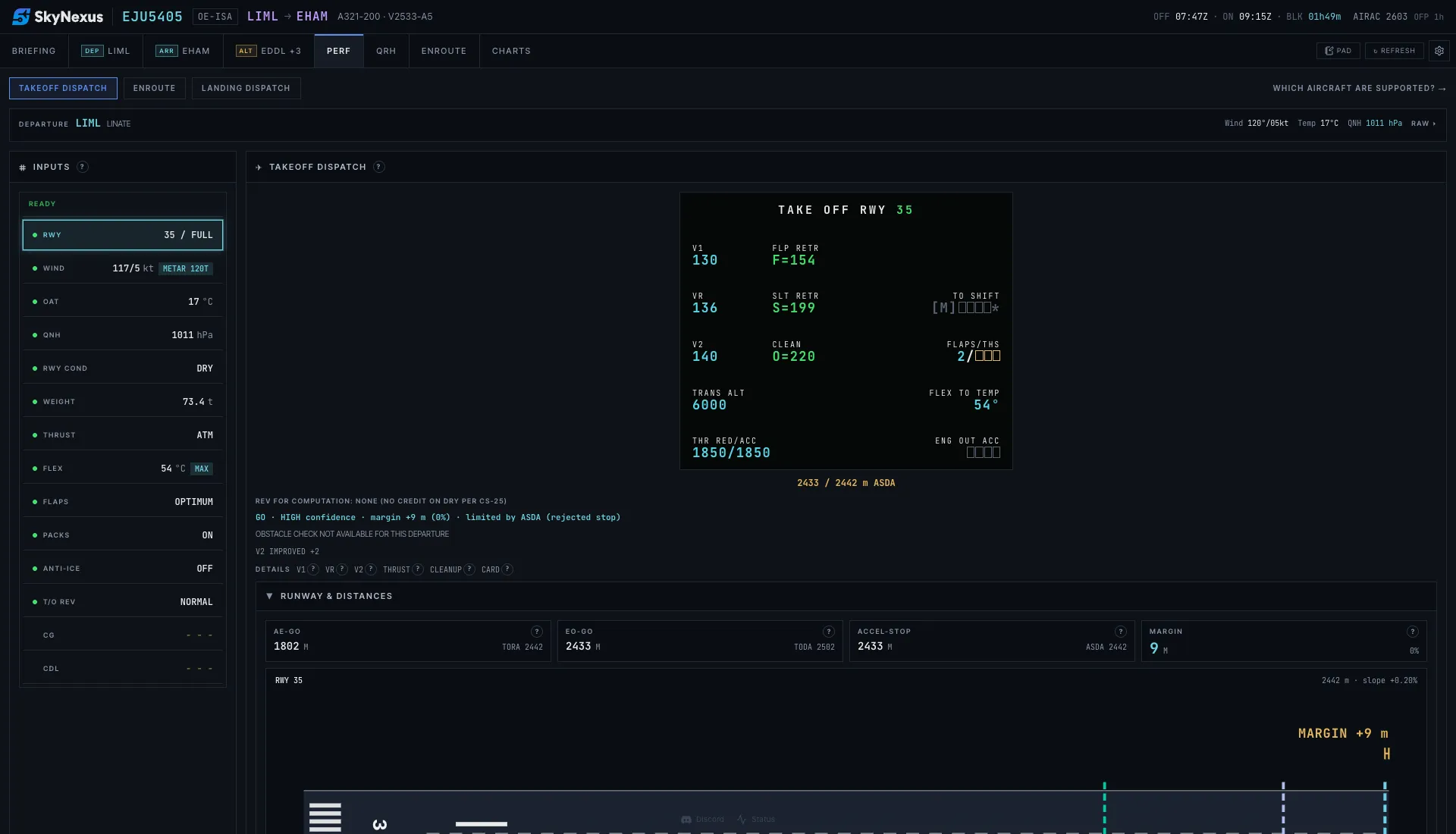
SkyNexus is a web page, so it works next to any simulator: it reads your SimBrief flight plan and the latest METAR and works out FLEX, V-speeds, the takeoff flap and the landing distance for the A320 or A321 you filed. Keep it open on a second screen or a tablet next to X-Plane 12 and your ToLiss.
Which ToLiss variants SkyNexus covers
ToLiss offers each A320 family member with a choice of engines. SkyNexus has one model per type and picks it from the aircraft type in your SimBrief flight plan. This is how they line up:
- A320 CEO with CFM56-5B4: an exact match (SimBrief type A320).
- A320 CEO with IAE V2527-A5: works on the CFM56-5B4 model, with small differences on hot days.
- A320 NEO with LEAP-1A26: an exact match (SimBrief type A20N).
- A320 NEO with PW1127G-JM: works on the LEAP-1A26 model, with small differences.
- A321 CEO with IAE V2533-A5: an exact match (SimBrief type A321).
- A321 CEO with CFM56-5B3: works on the V2533-A5 model, with small differences.
- A321 NEO with LEAP-1A33: close to the SkyNexus model, which has the LEAP-1A32. The PW1130G-JM works on the same model with larger differences. The LR and XLR carry extra fuel tanks and heavier weights that the model does not cover.
- A319, A330-900 and A340-600: not supported yet.
What you get
- V1, VR and V2, FLEX temperature up to the certified ceiling for the engine, and OPTIMUM flap across CONF 1+F, 2 and 3.
- All three takeoff distances checked against TORA, TODA and ASDA, with intersection departures.
- The engine-out flight path checked against terrain and obstacles in the departure sector.
- Landing distance with the regulatory margin and the distance you will really use, for dry, wet and contaminated runways.
- On the A321 and A321neo the QRH landing distance next to the model. The runway condition code input and landings with a failure are there for the A320ceo, A321 and A321neo, not yet for the A320neo.
Next to the ToLiss EFB
ToLiss lists an EFB with takeoff and landing performance among the common features of its aircraft. SkyNexus is useful as a second opinion and as the place where the rest of the briefing lives: weather per runway, NOTAMs, charts through ChartFox, live VATSIM and IVAO ATC on your route and the enroute map. If two tools disagree by a few degrees of FLEX, the usual reasons are the weight, the runway data and how each tool handles a wet runway or obstacles.
- Why takeoff calculators disagree explains each reason.
- What SkyNexus builds from your OFP besides performance.
More on each type
- A320 and A320neo performance
- A321 and A321neo performance
- Landing distance calculator for every supported type.
ToLiss performance FAQ
- Does SkyNexus work with X-Plane 12?
- Yes. SkyNexus runs in the browser and takes its inputs from SimBrief and the live weather, not from the simulator, so it works next to X-Plane 11 and 12 as well as MSFS and P3D.
- Which ToLiss engine options match exactly?
- The A320 CEO with CFM56-5B4, the A320 NEO with LEAP-1A26 and the A321 CEO with IAE V2533-A5. The other engine options use the closest SkyNexus model and can show small differences.
- Does it support the ToLiss A321LR or XLR?
- Not as separate models. Their extra tanks and higher weights are outside what the A321neo model covers.
- Is it free?
- Yes. Create an account and enter your SimBrief Pilot ID. You can try it first with the demo flight.
- Is SkyNexus made by ToLiss?
- No. SkyNexus is an independent, free EFB and is not affiliated with ToLiss.
Get your numbers for the next ToLiss departure
Free, in the browser, filled in from your SimBrief flight plan.
Open SkyNexus