Landing distance for the A320 and the rest of your fleet
Before the approach brief you want to know two things: will the aircraft stop on this runway with the margin the rules ask for, and how much runway will it really use today. SkyNexus answers both from your SimBrief flight plan and the latest METAR at the destination, for the A320, A320neo, A321, A321neo and 737-800, with indicative numbers for the 777-300ER and A380-800. It is free and runs in your browser next to the sim.
Two distances, and why you need both
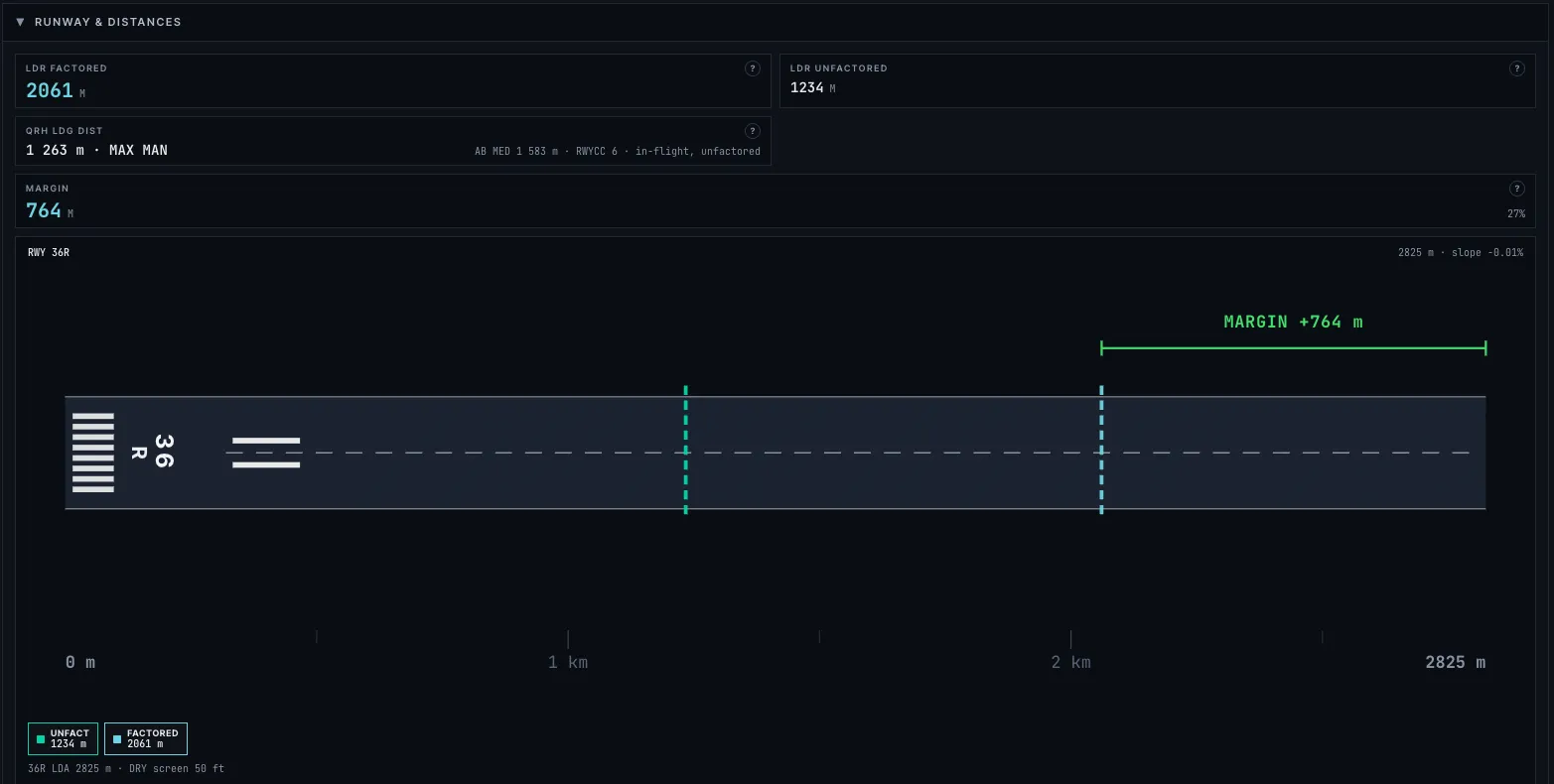
The required landing distance is the dispatch number. It takes the distance the aircraft needs and adds the regulatory margin: the dry figure is multiplied by 1.67, and a wet runway adds 15 percent on top of that. This is the number that has to fit inside the landing distance available when you plan the flight.
The unfactored distance is what you can expect to use on the day, with the autobrake and reverse thrust you plan to use, and no regulatory margin. On arrival, when the weather or the runway state has changed, compare it plus a 15 percent margin with the runway. SkyNexus shows both side by side, with the margin against the landing distance available for your runway.
What goes into the number
- Landing weight from the OFP, and the flap setting you plan to use.
- Wind, temperature and QNH from the latest METAR, with headwind and tailwind components for your runway and the tailwind limit of the type.
- Runway condition: dry, wet or contaminated, or the runway condition code straight from the ATIS or SNOWTAM on the A320ceo, A321, A321neo and 737-800.
- Autobrake setting and reverse thrust, so you can see what MED against LOW, or idle reverse, does to the distance.
- Runway elevation and slope from the airport data.
Checked against the QRH
On the A320ceo, the A321, the A321neo and the 737-800 the landing distance from the type's own QRH sits next to the model, so you can see both and pick the one you trust. On the A320 the required landing distances come out 1 to 5 percent longer than the published FCOM values. Every number has a help button that shows how it was worked out.
Landing with a failure
Pick a failure, such as the loss of a hydraulic system, jammed flaps or slats or an engine out, and the approach speed and landing distance follow the QRH correction for it, with the landing flap the checklist asks for. This is there for the A320ceo, the A321, the A321neo and, with sixteen non-normal configurations, the 737-800. A diversion assistant in the QRH tab ranks nearby airports by whether your landing distance fits, the weather and the crosswind, and shows which have ATC online.
Where you will vacate
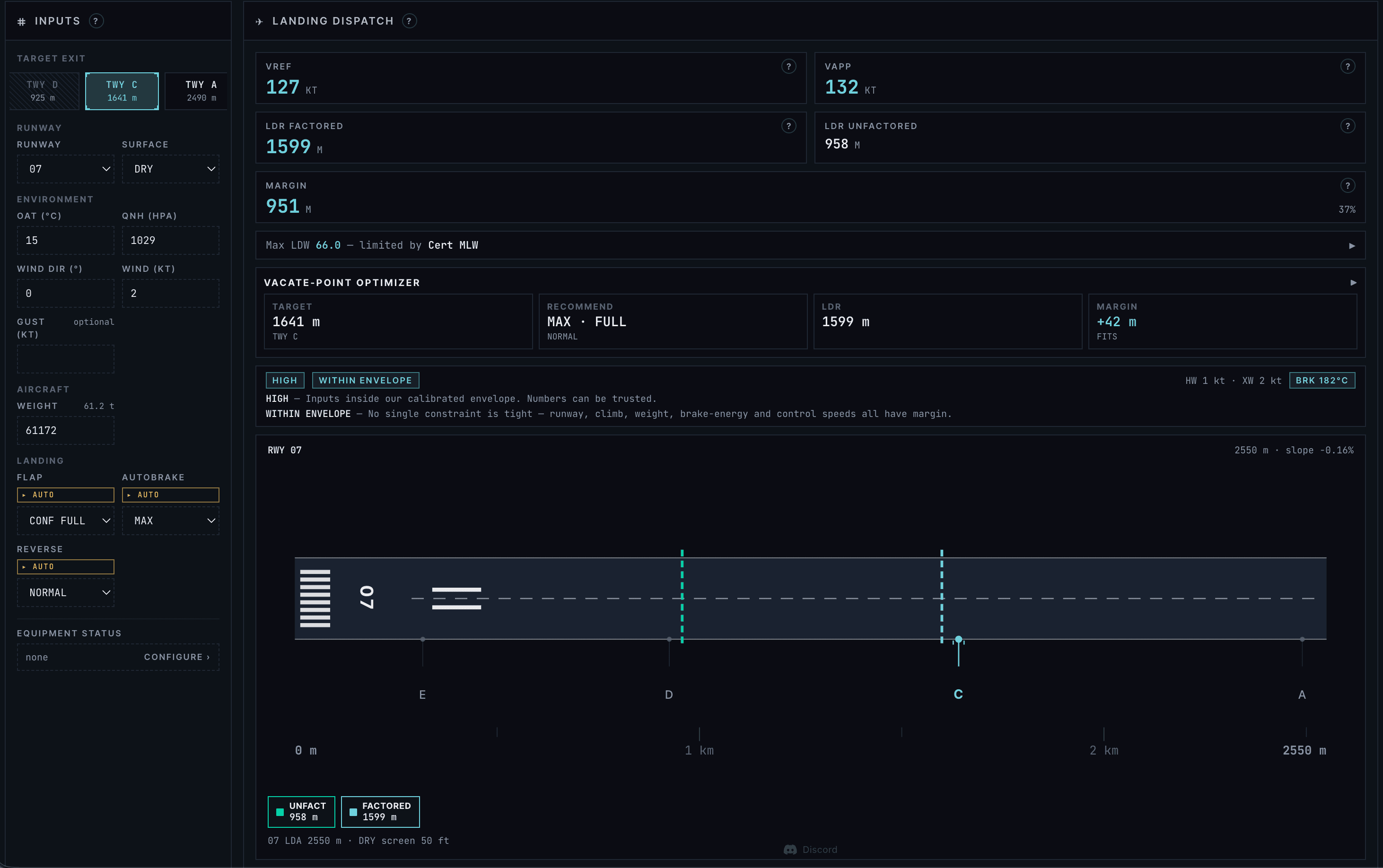
From the landing weight, the wind and the runway layout, the briefing predicts which exit you will make, so you can brief the taxi route before you start the approach.
Takeoff numbers for the same aircraft
- A320 and A320neo performance with FLEX, OPTIMUM flap and the engine-out procedure.
- A321 and A321neo performance with QRH landing distances and failures for both types.
- 737-800 performance with QRH landing speeds, non-normal landings and brake cooling.
- Every supported aircraft on one page.
Landing distance FAQ
- Is the landing distance calculator free?
- Yes. Create an account, enter your SimBrief Pilot ID and the landing page of the PERF tab is there for every supported flight plan. You can try it first with the demo flight.
- What is the difference between the required and the actual landing distance?
- The required landing distance includes the regulatory margin: the dry distance times 1.67, plus 15 percent on a wet runway. The actual, or unfactored, distance is what the aircraft uses on the day with your autobrake and reverse thrust and no margin. Plan with the first. On arrival, compare the second plus a 15 percent margin with the runway.
- Does it handle wet and contaminated runways?
- Yes. Choose dry, wet or a contaminant, or, on the A320ceo, A321, A321neo and 737-800, enter the runway condition code from the ATIS or SNOWTAM, and the braking and the distance follow. On the 737-800 the code reads the QRH braking action tables.
- Which aircraft does it support?
- The A320, A320neo, A321, A321neo and 737-800. The 777-300ER and A380-800 have indicative landing numbers, and the app labels them that way.
- Can I use it for a real aircraft?
- No. It is a tool for flight simulation and learning, not certified, and it must never be used for a real flight.