Performance for the Fenix A320 and A321, from your SimBrief OFP
The Fenix A320 has its own performance calculator in the EFB. SkyNexus is a second opinion that lives next to the sim: it reads your SimBrief flight plan and the latest METAR, works out FLEX, V-speeds and the best flap for the runway you filed, checks the engine-out path against terrain and gives you the landing distance for the arrival. This page lists which Fenix variants it matches and where the numbers can differ.
Which Fenix variants SkyNexus covers
According to fenixsim.com (October 2026), Fenix sells the A320 with CFM56-5B4 or IAE V2527-A5 engines, and an expansion with the A319 and A321, each with a CFM or an IAE option. All of them are ceo. SkyNexus picks its model from the aircraft type in your SimBrief flight plan, so this is how the two line up:
- A320 with CFM56-5B4: an exact match. SkyNexus models the A320ceo with this engine. File it as A320 in SimBrief.
- A320 with IAE V2527-A5: works, using the CFM56-5B4 model. Expect small differences in FLEX and distances, because the two engines lapse differently on a hot day.
- A321 with IAE V2533-A5: an exact match. File it as A321 in SimBrief.
- A321 with CFM56-5B3: works, using the V2533-A5 model, with the same caveat as the IAE A320.
- A319: not supported yet. For an A319 flight plan the briefing says the type is not modelled and links to the list of supported aircraft.
What you get for a Fenix departure
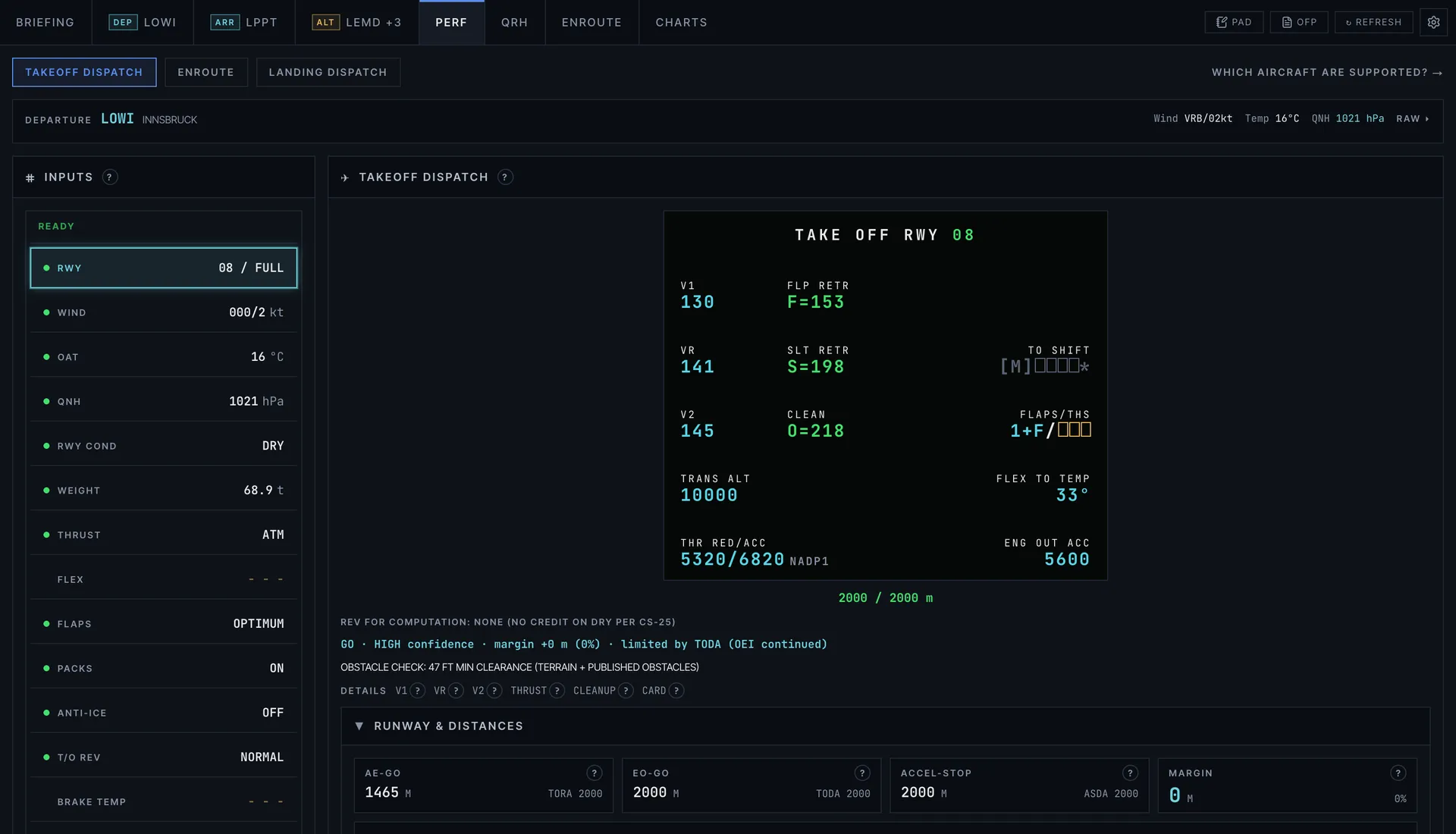
- V1, VR and V2, with the minimum control speeds as a floor.
- FLEX temperature up to the certified ceiling: ISA + 55 on the A320 (70 °C at sea level), ISA + 42 on the A321 with V2533-A5 engines.
- OPTIMUM flap: CONF 1+F, 2 and 3 are each checked and the one with the most runway margin wins.
- Intersection departures with the takeoff shift, and the result laid out like the MCDU PERF TAKE OFF page so you can type it straight across.
- The engine-out flight path checked against terrain and obstacles, and the engine-out procedure drawn on a map when the airport publishes one.
And for the arrival
For landing you get the required distance with the regulatory margin and the distance you will really use, for dry, wet and contaminated runways, with autobrake and reverse thrust. You can enter the runway condition code from the ATIS. On both types the QRH landing distance sits next to the model, and on both you can pick a failure and get the landing distance that goes with it. The briefing also predicts which exit you will make.
- How the landing distance works and what goes into it.
Why it can differ from the Fenix EFB
Two good calculators can give different numbers for the same takeoff, and that does not mean one of them is wrong. The engine option, the runway data each tool uses, whether obstacles are checked, how a wet runway is handled and where the weight comes from all move the result by a few degrees of FLEX or a few knots. A common one is the weight: SkyNexus uses the weight in your OFP, so if you loaded something different in the aircraft, update the OFP or type the new weight in.
- Why takeoff calculators disagree goes through each reason in detail.
More on the A320 family
- A320 and A320neo performance with MEL items, trim and where the numbers come from.
- A321 and A321neo performance with QRH landing distances and 13 failure cases.
- What FLEX temperature is and why some runways give none.
Fenix A320 performance FAQ
- Does SkyNexus work with the Fenix A320?
- Yes. SkyNexus runs in your browser next to MSFS 2020 or MSFS 2024 and takes its inputs from your SimBrief flight plan, not from the aircraft, so it works with the Fenix A320 and A321 like with any other add-on.
- Which Fenix engine option matches best?
- The A320 with CFM56-5B4 engines and the A321 with IAE V2533-A5 engines match the SkyNexus models exactly. The other engine options use the same models and can show small differences.
- Is the Fenix A319 supported?
- Not yet. SkyNexus covers the A320, A320neo, A321, A321neo and 737-800, with indicative numbers for the 777-300ER and A380-800.
- Why is my FLEX different from the Fenix EFB?
- Usually because of a different weight, runway data, engine option or wet runway handling. The SkyNexus help button on every number shows exactly which inputs and limits it used, so you can see where the difference comes from.
- Is SkyNexus made by Fenix?
- No. SkyNexus is an independent, free EFB and is not affiliated with Fenix Simulations.
Get your numbers for the next Fenix departure
Free, in the browser, filled in from your SimBrief flight plan.
Open SkyNexus