The SIGWX chart, drawn over your own route
A SIGWX chart is the first weather picture an airline crew looks at: where the thunderstorms are and how high they go, where the clear air turbulence and icing are, and where the jet streams run. SkyNexus draws the WAFS high-level SIGWX on the enroute map over your SimBrief route, reads it along the flight for you, and shows it in the vertical profile. It is free and runs in your browser next to the sim.
It looks like the chart you know
CB areas have their scalloped edge and a label such as OCNL CB with the top over the base. Clear air turbulence has the hat symbol, icing its own symbol, and every area its label box with the levels stacked as the chart prints them, XXX where the area runs past the chart. Tropopause heights sit in boxes, and volcanoes and tropical cyclones have their symbols. The title box says which chart you are looking at, for example WAFS SIGWX FL100-600, valid 09Z.
The jet streams are drawn as one line along each core, with the wind symbol growing out of it, the core level and the depth of the jet, such as FL390 with 280/490, and bars where the speed or height changes.
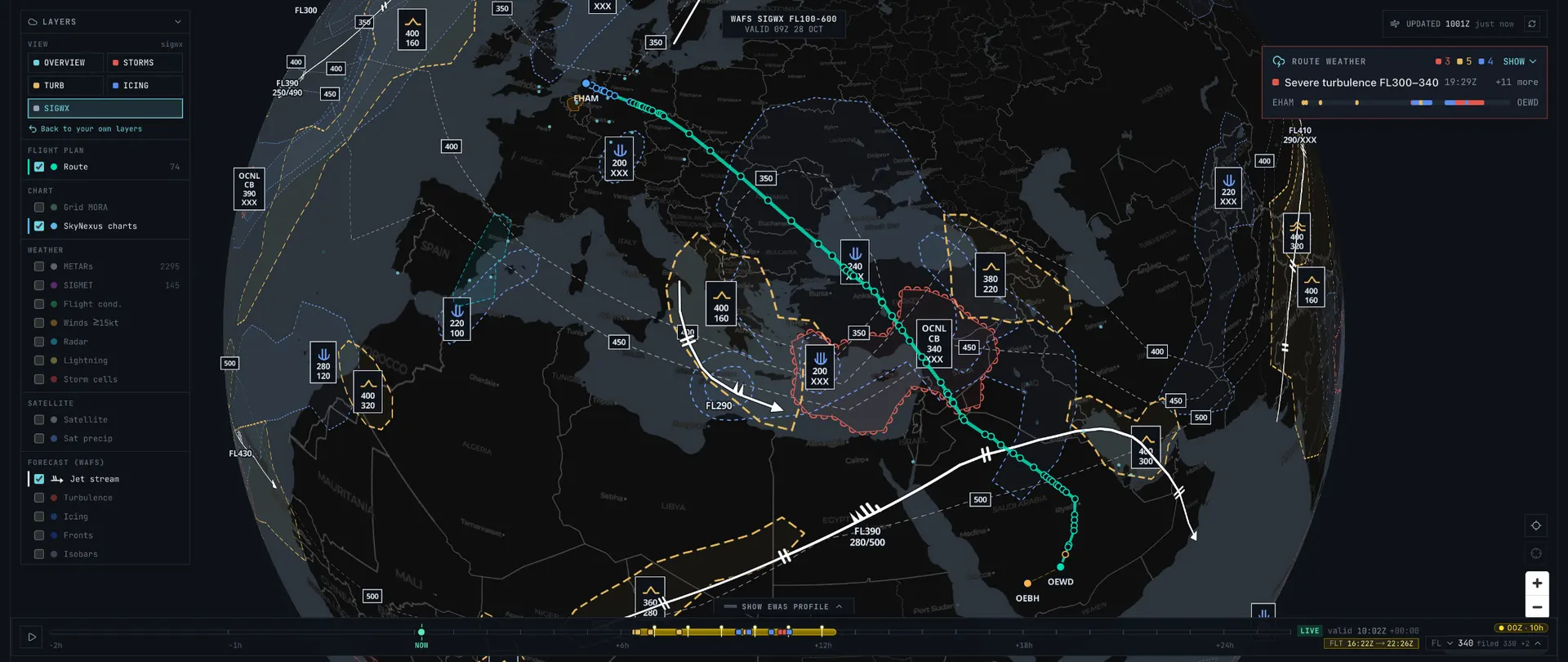
The chart for the time you are there
SIGWX charts are issued for every three hours. The map follows the timeline, so drag it to your arrival and you see the chart valid then. The route weather does the same along the whole flight: every part of the route is read on the chart that is valid when you get there.
SIGWX in the route weather
The route weather lists what the flight meets, in flight order, and SIGWX is one of its sources next to the GFS forecast, SIGMETs, storm cells and lightning. A line reads like SIGWX: occasional CB, tops FL460, with where it is and which chart it came from.
- Red when your planned level is inside the area in cruise, and for a CB also in the climb or descent.
- Amber for turbulence or icing in the climb or descent, and when you pass within 4,000 ft above or below an area.
- Areas far above or below your level are left out, so the list stays about your flight.
- Tap a line and the map shows the SIGWX chart at that time, with the stretch of route highlighted.
SIGWX in the vertical profile
In the eWAS profile under the map, each SIGWX area on the route is a box from its base to its top over the stretch of route it covers: CB in red with the scalloped edge, turbulence in amber, icing in blue, with the chart's own label. Your planned climb, cruise and descent run through the same picture, so you see at a glance whether a step climb or a lower level keeps you out of it.

Where the data comes from
The SIGWX areas are the WAFS significant weather forecast that the World Area Forecast Centre in Washington publishes through the NOAA Aviation Weather Center, the multi-timestep SIGWX from FL100 to FL600. SkyNexus does not make its own version: what you see is the official forecast, drawn for the sim. The jet streams come from the GFS forecast the rest of the weather map uses, and were checked against the WAFS jets.
- Aviation Weather Center SIGWX for the source charts.
More on the weather map
- Flight sim weather map with lightning, storm cells, satellite and the eWAS profile.
- SimBrief EFB for the briefing that reads your OFP.
SIGWX chart FAQ
- What is a SIGWX chart?
- A significant weather chart: a forecast of the weather that matters to aircraft in cruise, issued by the World Area Forecast Centres. It shows thunderstorm (CB) areas, clear air turbulence, icing, jet streams with their speed and level, the tropopause height, volcanoes and tropical cyclones.
- Is the SIGWX chart in SkyNexus free?
- Yes. Create an account, enter your SimBrief Pilot ID and the SIGWX layer is on the enroute map for every flight plan. You can try it first with the demo flight.
- How do I read the label boxes?
- The top of the area over its base, in flight levels: a CB box with OCNL, CB, 340 and XXX means occasional thunderstorms with tops at FL340 and a base below the chart's lower limit. XXX means the area runs past the chart's range, below FL100 or above FL600.
- How often is the chart updated?
- The WAFS runs four times a day, each with charts every three hours ahead. SkyNexus picks up a new run once it is published and always draws the chart valid nearest the time on your timeline.
- Does it work with MSFS, X-Plane and VATSIM?
- Yes. SkyNexus runs in a browser, so it works next to any simulator, and it reads your flight from SimBrief. On VATSIM it also shows controllers and traffic on the same map.
See the SIGWX chart over your next flight
Free, in your browser, from your SimBrief flight plan.
Open SkyNexus