Icing for flight simmers: where it matters and how to read it
When airframe ice forms, why it is mostly a climb and descent hazard, how the icing forecast is made, and when to switch the anti-ice on.
By Joeri Smits, founder of SkyNexus
Icing is the weather hazard that is easiest to ignore in the sim, because most aircraft cope with it if you remember the anti-ice. Real crews do not ignore it: ice on the wing changes the lift, ice on the engine intake can damage the engine, and the anti-ice costs fuel and thrust. Knowing where you will meet icing tells you when to switch things on and which part of the flight to watch.
When ice forms
Airframe ice needs two things: liquid water and temperatures at or below freezing. That sounds contradictory, but clouds are full of supercooled water droplets that stay liquid below 0 °C until they hit something, like your wing. The worst icing is usually between 0 and about −15 °C, in thick, moist cloud with rising air. Much colder than that, most of the water has already frozen into ice crystals that do not stick.
That is why icing is mostly a climb and descent hazard for an airliner. At FL350 it is usually far too cold, but the layer from the freezing level up to about FL200 is where you spend the first and last minutes of every flight.
How SkyNexus forecasts it
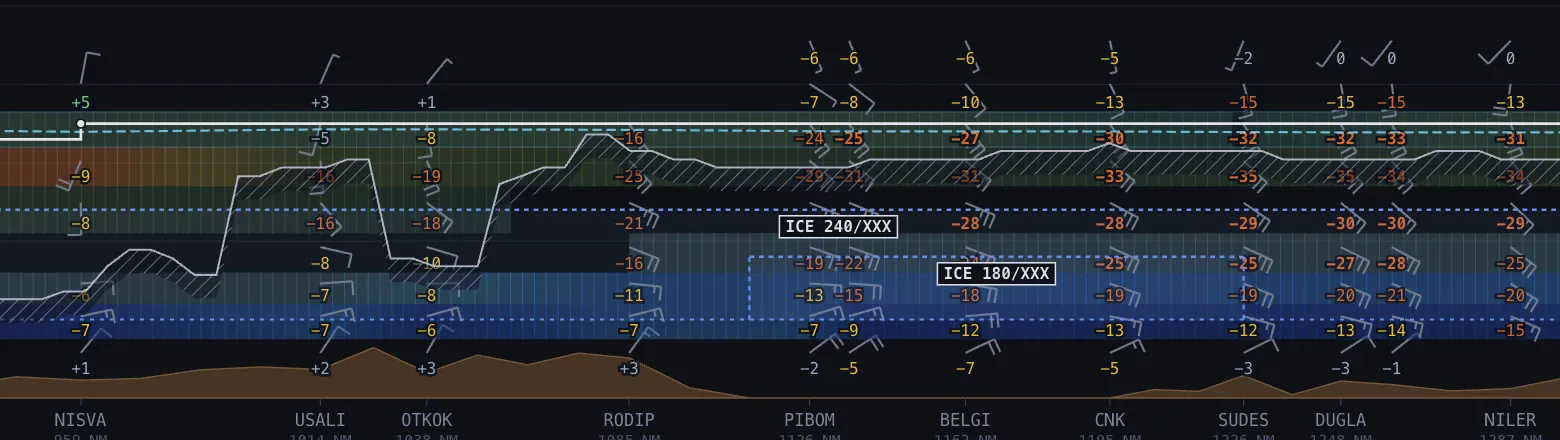
The icing layer is computed from the GFS model with a classifier based on temperature and humidity, the same idea as the CIP-style products forecasters use:
- Trace: −20 to 0 °C with relative humidity of at least 65 %.
- Light: −15 to 0 °C with at least 75 %.
- Moderate: −12 to 0 °C with at least 85 %.
- Severe: −8 to 0 °C with at least 95 % and rising air.
It covers the same levels as the turbulence layer, FL050 to FL450, every hour out to 36 hours. In the route weather list, moderate or severe icing at your cruise level is red, and light icing or worse in your climb or descent is amber, with the time and the levels where you meet it. The SIGWX chart adds its own icing areas from the official forecast.
What to do with it in the sim
- Engine anti-ice. Most airliner procedures ask for engine anti-ice in icing conditions, defined roughly as visible moisture with a temperature of 10 °C or less. An amber icing line in your climb is the reminder to have it on before you enter the cloud, not after.
- Wing anti-ice. Usually used when ice builds up on the airframe, which on most types you will notice first on the wipers or an ice indicator. Know your aircraft’s procedure.
- The descent. Icing in the descent often comes with the arrival weather: low cloud, freezing levels close to the ground, sometimes freezing rain in the TAF. Plan the anti-ice in your descent briefing.
- Performance. Anti-ice on takes bleed air, which can lower takeoff performance and raise fuel burn. If it is needed on the ground, include it in your takeoff calculation.
More in this series
- How to brief weather for a flight sim flight
- Thunderstorms in the sim
- Turbulence forecasts for sim pilots
- The TAF at your ETA
- The SkyNexus weather map, with every layer explained.
Questions pilots ask
- Why is there no icing at my cruise level?
- Usually because it is too cold. Above about FL250 the water in clouds has mostly frozen into ice crystals, which do not stick to the aircraft. Icing is mostly a climb and descent hazard for airliners.
- Why is light icing in cruise not on the list?
- In cruise only moderate and severe icing raise a line. In the climb and descent light icing counts too, because that is where it matters for switching the anti-ice on in time.
- Does my sim simulate icing?
- Most current sims and many add-on airliners do, some in more detail than others. Either way, flying the anti-ice procedure at the right time is part of flying it the way real crews do.
Try SkyNexus EFB
Free, browser-based, runs alongside MSFS 2024, X-Plane or P3D. Import your SimBrief OFP and get the full briefing in under a minute.
Get Started Free