The TAF at your ETA: is the forecast good enough to land?
How to read a TAF for your arrival time, why TEMPO and PROB groups count, the CAT I, CAT II and alternate minima, and what to do when it is amber.
By Joeri Smits, founder of SkyNexus
The last question of every weather briefing is the most practical one: will the weather at my destination let me land when I get there? Not the weather now, the weather at your ETA. And if it does not, does my alternate work at the time I would get there instead? This post explains how to read a TAF for that, and how SkyNexus checks it for you.
A TAF in one minute
A TAF is the forecast for an airport for the next 24 to 30 hours. It has a base forecast and change groups:
- FM (from): the weather changes at that time and stays that way.
- BECMG (becoming): the weather changes gradually during the given period.
- TEMPO: temporary changes, each lasting less than an hour, during the period.
- PROB30 and PROB40: a 30 or 40 % chance of the conditions in the group.
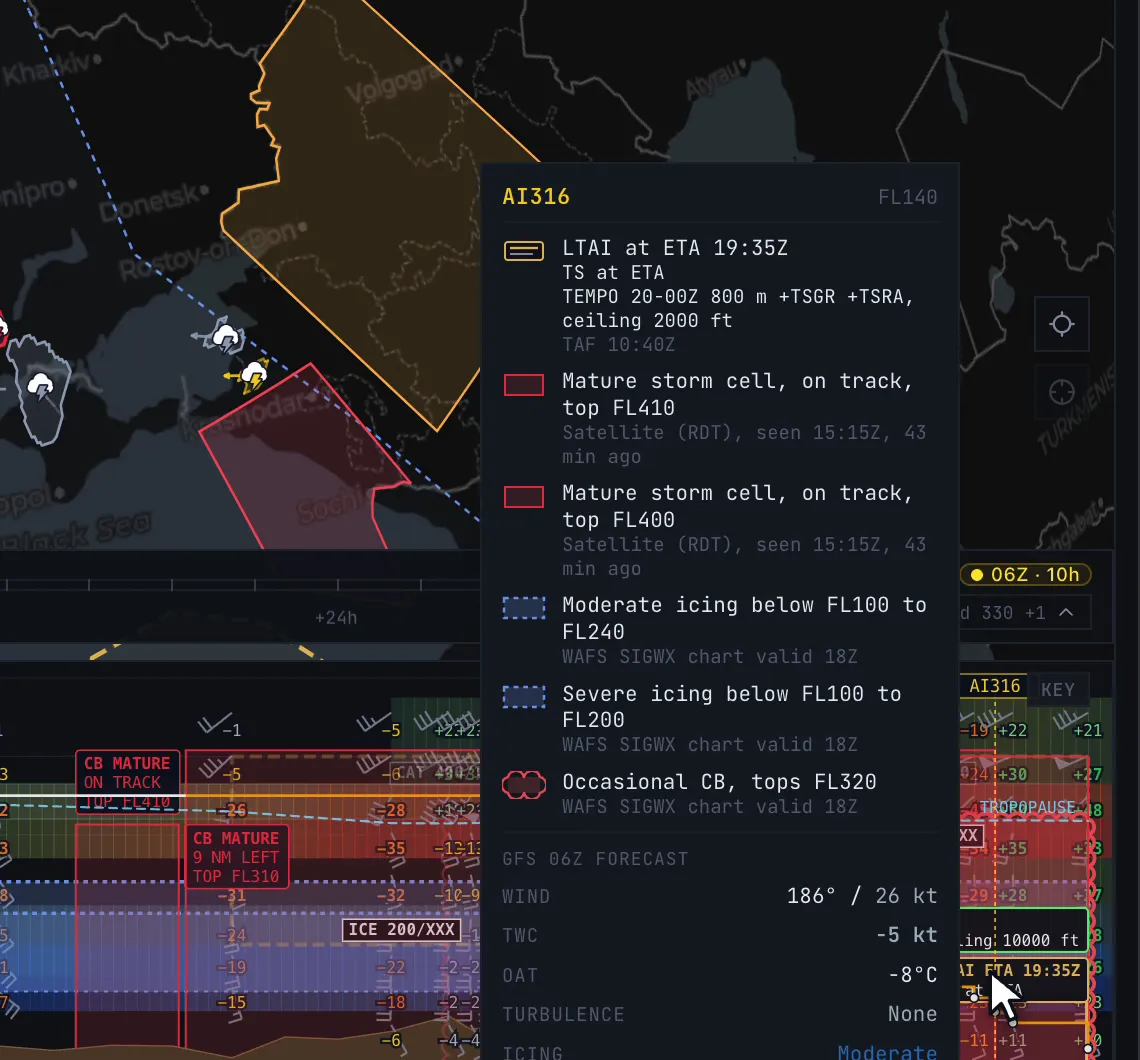
Take a line from the Antalya TAF in the video: TEMPO 20-00Z 800 m +TSGR +TSRA, ceiling 2000 ft. Between 20 and 00Z there may be heavy thunderstorms with hail and rain, with the visibility down to 800 m for short periods. If your ETA is 19:35Z, that group starts 25 minutes after you land, which is a reason to watch your arrival time closely.
Read the TAF at your ETA, with a margin
Real dispatchers check the forecast for a window around the arrival time, because ETAs slip. SkyNexus does the same:
- The departure is read at your ETD, the destination at your ETA, and the alternate at your ETA plus the flight time to the alternate.
- For each, it reads the TAF one hour either side of that time.
- The prevailing weather is the worst of the base, FM and BECMG groups in that window. A BECMG counts both before and after its change.
- The worst TEMPO or PROB group that overlaps the window is laid on top.
That is why the Antalya card below says “TS at ETA” for a 19:35Z arrival: the thunderstorm TEMPO starts at 20Z, inside the hour after your ETA.
The minima SkyNexus checks against
Whether a forecast is good enough depends on the approach you fly. SkyNexus assumes an ILS and uses simple, standard numbers:
- CAT I: 200 ft ceiling and 550 m visibility.
- CAT II: 100 ft and 300 m.
- Alternate planning: 400 ft and 1350 m, a simplified version of the higher minima you need to plan an airport as an alternate.
- Low-visibility takeoff: 125 m.
The result is red, amber or green for each airport:
- Destination: red below CAT II. Amber below CAT I, in the prevailing weather or a TEMPO or PROB group, with thunderstorms forecast, or with no TAF.
- Alternate: red below CAT I. Amber below the planning minima, with thunderstorms, or with no TAF.
- Departure: red below the low-visibility takeoff minimum. Amber when you need a takeoff alternate (below CAT I) or with thunderstorms at your ETD.
These lines show in the route weather list and at the end of the vertical weather profile, so the last thing you read in the briefing is whether the arrival works.
What to do with an amber or red arrival
- Thunderstorms at your ETA. Look at the time of the TEMPO group against your ETA. Leaving earlier or later is a real option in the sim. Otherwise plan extra fuel for holding and know your alternate well.
- Below CAT I at the destination. Check that your aircraft and the runway support CAT II or III, and brief the low-visibility approach.
- Alternate below planning minima. Pick another alternate in SimBrief and load the OFP again.
- No TAF. Small airports often have none. Read the METAR and the TAF of a nearby airport, and be more careful with the alternate.
More in this series
- How to brief weather for a flight sim flight
- Thunderstorms in the sim
- Turbulence forecasts for sim pilots
- Icing for flight simmers
- The SkyNexus weather map, with every layer explained.
Questions pilots ask
- Why does SkyNexus read the TAF one hour either side of my ETA?
- Because arrival times slip. A forecast that only works at the exact minute you planned is not a forecast you can plan with.
- Does a TEMPO group count?
- Yes. The worst TEMPO or PROB group that overlaps the window is laid over the prevailing weather. That is why a TEMPO with thunderstorms or low visibility can turn an arrival amber.
- What if my approach is not an ILS?
- SkyNexus assumes an ILS. For a non-precision approach your minima are higher, so treat an amber line as more serious and check the chart minima yourself.
Try SkyNexus EFB
Free, browser-based, runs alongside MSFS 2024, X-Plane or P3D. Import your SimBrief OFP and get the full briefing in under a minute.
Get Started Free