Thunderstorms in the sim: see them and plan around them
Storm cells from satellite, cloud tops, lightning within 25 NM of your track, and how to plan a way around a thunderstorm before you push back.
By Joeri Smits, founder of SkyNexus
Thunderstorms are the one kind of weather real crews never fly through on purpose. The turbulence inside a mature cell can be severe, there is hail, icing and lightning, and the airflow around it can be violent well outside the cloud. In the sim you can fly straight through, but planning around a storm is one of the most satisfying parts of a realistic flight, and on VATSIM it is a reason to talk to ATC. This post covers how to see thunderstorms on your route before you take off, and how to plan around them.
What the satellite sees
The storm cells in SkyNexus come from EUMETSAT’s Rapid Developing Thunderstorms product, which tracks convective cells in the Meteosat images. A new picture arrives every 15 minutes, 20 to 40 minutes after the moment it shows. Each cell has an outline, a cloud top, a direction and speed of travel, and a phase:
- Triggering and growing: a cell that is building. These can grow fast, so treat them as storms.
- Mature: a full thunderstorm, the one to stay away from.
- Decaying: a cell that is falling apart. SkyNexus shows it on the map but does not raise it as a hazard on your route.
The arrow on a cell shows where it moves towards and how far it gets in 30 minutes. Cells slower than 5 kt show as nearly stationary. The product covers the Meteosat disc: Europe, Africa, the Middle East, the Atlantic and the east of South America.
Cloud tops: can you climb over it?
Every cell has a cloud top, measured from the satellite as a pressure and turned into a flight level, so it reads like “TOP FL380”. “OT” after it means an overshooting top, a dome of cloud punching through the anvil, which is a sign of a strong updraught. If the satellite has no top for a cell, the column is drawn to FL400 and the label shows a “~”.
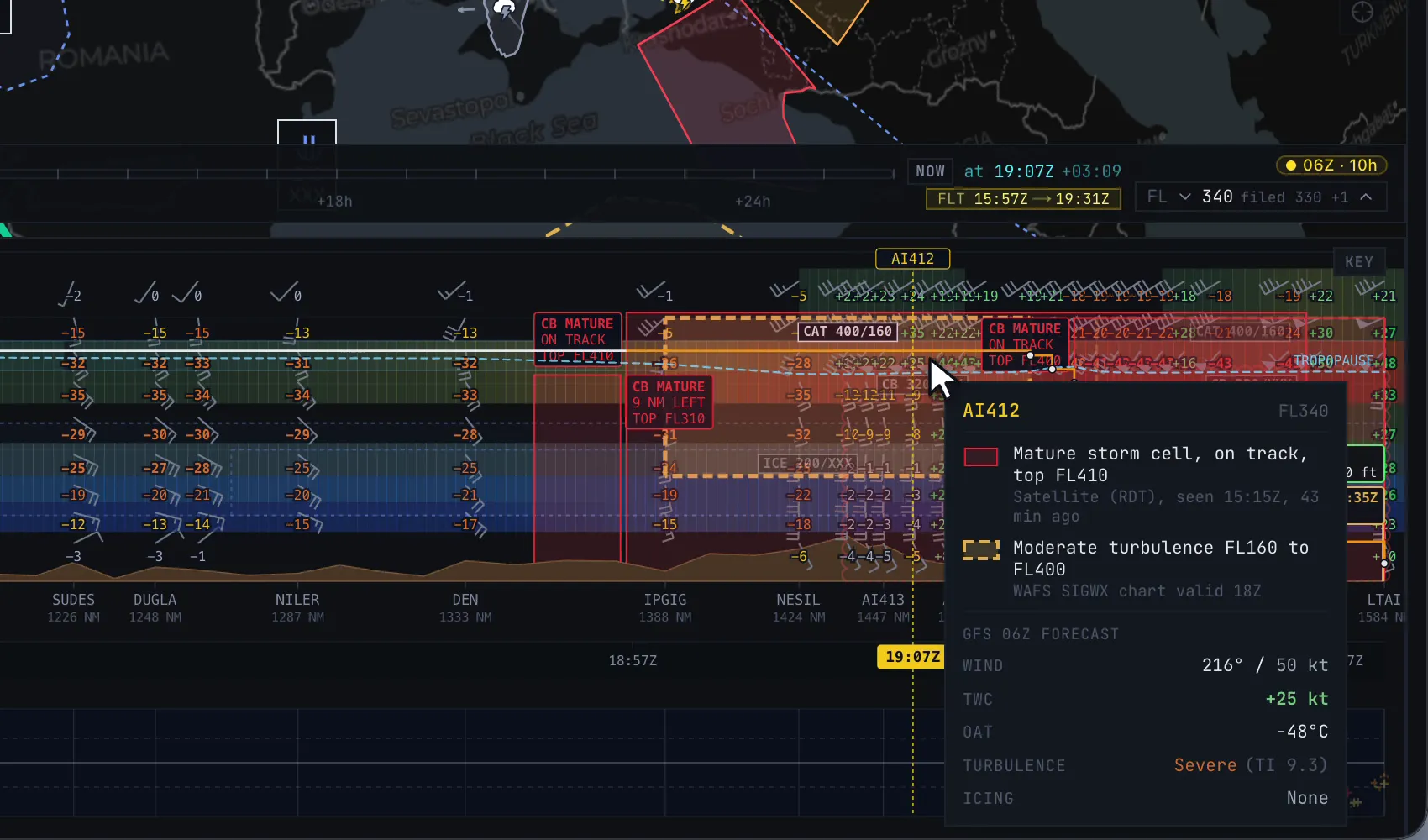
In the vertical weather profile each cell along your route stands as a column up to its top, labelled with its phase and how far it is from the track, for example “CB MATURE, 9 NM LEFT, TOP FL380”. “On track” means the route runs through the outline.
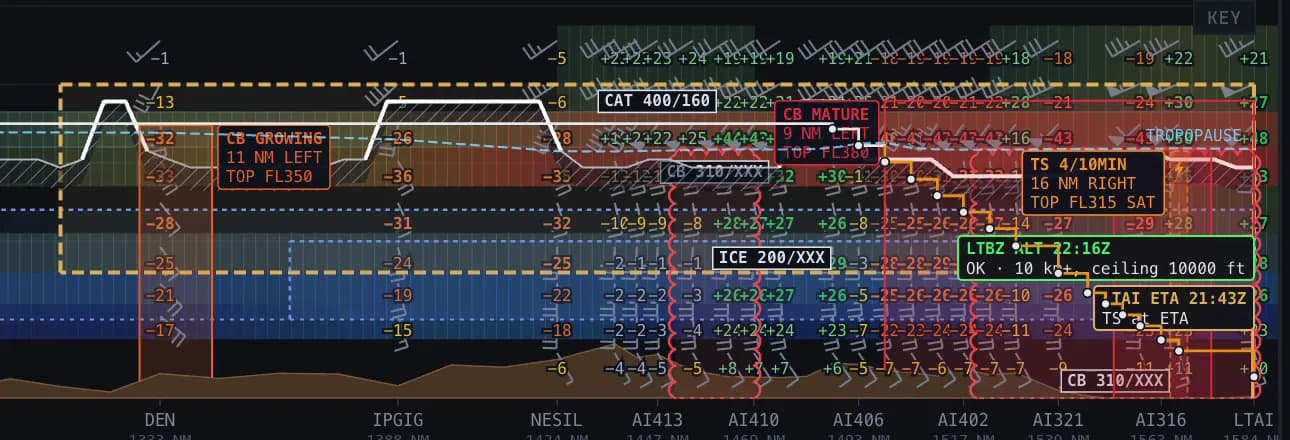
A rule of thumb many pilots learn is not to try to top a storm unless you can clear it by a good margin, and with a thunderstorm reaching FL380 an airliner in cruise rarely can. In practice the answer is usually to go around it, not over it.
Lightning: proof that a cell is active
Lightning is the clearest sign that a storm is alive. SkyNexus shows strikes from EUMETSAT’s Meteosat Lightning Imager over Europe, Africa and the Middle East, about 11 minutes behind, and from NOAA’s GOES satellites over the Americas, 1 to 2 minutes behind. Strikes are coloured by age: white under 5 minutes, then yellow, orange and red up to 30 minutes.
Two things use lightning directly. On the map, your route turns amber where strikes from the last 20 minutes are within 20 NM. In the profile, a strip below the flight path shows every strike up to 25 NM either side of the track, and where flashes cluster within 20 NM of the route they show as a column too. East Asia and Australia have no lightning coverage yet.
How storms show up in the route weather
Growing, triggering and mature cells, and lightning clusters, on your path or within 20 NM of it, become lines in the route weather list:
- Red if you reach it within the next hour, it is on your path, and its top is at or above your planned level.
- Amber if you reach it within the hour but it is off the path or below your level.
- Blue, observed now if you reach it more than an hour from now. A storm cell is a picture of the present. By the time you get there it will have moved, grown or died, so it tells you an area is active, not where the storm will be.
For the later part of the flight the forecast tells the story: the SIGWX chart marks areas of CB with their tops, and a CB area on your route stays red even in the climb and descent.
Planning a way around
Airline manuals differ in the numbers, but the idea is the same everywhere: give a thunderstorm a wide berth, more at high level than low, and pass on the upwind side where you can, because the anvil and hail spread downwind. In the sim I plan it like this:
- Before departure, look for amber and red storm lines and SIGWX CB areas along the route. Note which side of the track they are on.
- Decide on a side and a rough distance. If the area is large, a different route in SimBrief may be easier than a long deviation.
- Carry extra fuel if the deviation or holding at your destination is likely.
- On VATSIM, ask for the deviation early: “request 20 miles left of track for weather” is a normal call.
- Check again before top of descent. Cells near your arrival move and grow, and the latest satellite picture is only 20 to 40 minutes old.
More in this series
- How to brief weather for a flight sim flight
- Turbulence forecasts for sim pilots
- Icing for flight simmers
- The TAF at your ETA
- The SkyNexus weather map, with every layer explained.
Questions pilots ask
- Is this the same as weather radar in the cockpit?
- No. Onboard radar sees precipitation ahead of the aircraft in real time. These are satellite and lightning observations, 1 to 40 minutes old depending on the source, plus forecasts. They are good for planning before and during the flight, not for picking your way through a line of cells in the last minute.
- Why is a storm on my route blue instead of red?
- Because you reach it more than an hour from now. A storm cell is an observation of the present, so for a later part of the flight SkyNexus tells you the area is active rather than pretending it knows where the cell will be.
- Does it cover the whole world?
- Storm cells cover the Meteosat disc: Europe, Africa, the Middle East, the Atlantic and the east of South America. Lightning covers Europe, Africa and the Middle East from Meteosat and the Americas from GOES. East Asia and Australia have no storm cell or lightning coverage yet; the SIGWX chart and the GFS layers still work there.
Try SkyNexus EFB
Free, browser-based, runs alongside MSFS 2024, X-Plane or P3D. Import your SimBrief OFP and get the full briefing in under a minute.
Get Started Free